On at install
Checkout abandoned
A customer reached checkout and left. Decide on a reminder, its timing and whether a discount is worth its cost.
Source: Shopify checkout updatesDecisioner reacts to customer events in your store: an abandoned checkout, a browse, a first order, a refund. For each customer it decides whether to react, which of your approved messages to use, on which connected channel and at what time. A holdout group shows what the messages really added.
Most marketing tools ask when to send. Decisioner first asks whether a message will help this customer at all, and stays quiet when it will not.
Shopify and your storefront report checkouts, carts, browsing, new customers, orders and refunds. Decisioner waits a set time, so a customer who comes back alone is left alone.
Consent per channel, order history, earlier messages, your exclusions and caps. The decision model sees only anonymous bands, never names or email addresses.
Whether to react, which approved message and offer, which connected channel and when. If two events compete for one customer, the more valuable message wins and your caps hold.
Messages wait for your approval, or run in auto mode inside your limits. Your own tool sends them. A random holdout shows the real difference in orders.
Each event kind is a use case with its own timing, offer limits and approved messages. Checkout recovery is on from the start; you switch on the others when you are ready.
A customer reached checkout and left. Decide on a reminder, its timing and whether a discount is worth its cost.
Source: Shopify checkout updatesProducts in the cart, no checkout. Decide whether a nudge helps, or whether the customer is better left alone.
Source: storefront pixel, with consentProduct views without a cart. A light touch at the right moment, or no message at all.
Source: storefront pixel, with consentA new customer account. Decide on a first message and the moment it is most likely to be welcome.
Source: new customer in ShopifyAfter a first order is fulfilled, decide whether and when to invite the next one, and if an offer is needed.
Source: order fulfilled in ShopifyAfter a large refund, decide whether a careful win-back message makes sense, with a capped offer or none.
Source: refund created in ShopifySends, skips and holdouts are all on record, with the eligibility checks, your approval and the hand-off to your tool. When Decisioner stays quiet, you can see why.
Example decisions to show the idea. They are not real customers or results.
Decisioner does not send messages itself. It hands each approved message to your connected marketing tool, which delivers it from your account, with your templates and your sender reputation.
Through Klaviyo, Omnisend, Brevo, Mailchimp, ActiveCampaign, Customer.io or a Shopify Flow workflow.
Through Twilio, Postscript, Omnisend, Brevo, Customer.io or Flow, only with SMS marketing consent.
Through Twilio, Brevo, WATI or Flow, for customers who opted in to WhatsApp messages.
Rich messages on supported phones through Twilio, with SMS as the fallback.
Available when Decisioner launches: Klaviyo and Shopify Flow. The other connections are built and are switched on one at a time, as each one passes verification with real accounts. Product names are trademarks of their owners and are shown as text only.
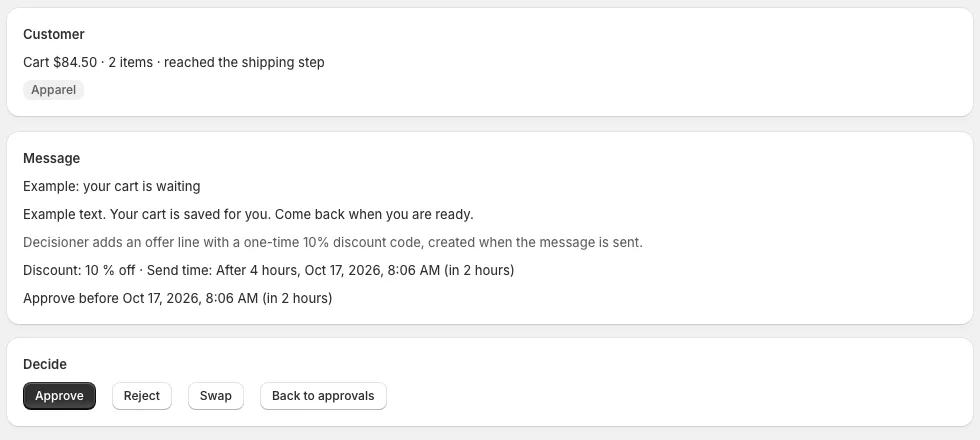
Every proposed message waits in the Approvals queue with its customer context, offer, channel and send time. Approve it, swap in another message or reject it with a reason that changes future decisions.
For each event kind, a random share of customers gets no message. Comparing their orders with the orders of customers who were messaged gives the lift: the orders that would not have happened anyway. On top of that, 5% of customers get no Decisioner marketing at all, so the overall effect stays measurable.
Until there is enough data, Home says so, instead of showing a number.
Each dot is one customer. Not to scale and not real data.
Messages go only to customers with marketing consent for that channel. When Shopify and your tool disagree, the stricter answer wins.
The decision model receives anonymous numbers about the event and the customer's history. Never names, email addresses, customer IDs or your store name.
Uninstall and your API keys are deleted at once, all other app data within 30 days. Shopify's customer data requests are handled automatically.
All features in every plan. Paid plans start with a 14-day free trial, once per store.
Charges are billed by Shopify every 30 days in USD. Upgrade, downgrade or switch to Free at any time in the app; a change takes effect when you approve it in Shopify. Every decision on a customer event counts once toward the limit, whatever the event kind; events skipped before a decision do not count. When a plan's limit is reached, new customer events are skipped until the 30-day count resets. Nothing is charged extra.
A Shopify store and one connected marketing tool. At launch that is Klaviyo or Shopify Flow; Flow is included in eligible Shopify plans. Customers need marketing consent for a channel before they get a message on it.
No. It hands each approved message to your connected tool, for example as a Klaviyo event or a Shopify Flow trigger. Your tool sends it, from your account and with your templates.
Abandoned checkouts, abandoned carts, browsing without a cart, new customers, second orders after a first fulfilled order, and refunds. Checkout recovery is on from the start; you switch on each other event kind separately.
No. When several events compete for one customer, Decisioner keeps the message worth most and drops the others. Your frequency caps and quiet hours apply across all event kinds; by default a customer gets at most one message a day.
With your permission, it learns from the orders that follow each event in your store. Without permission, it uses general rules only. You can turn learning off in Settings at any time.
Yes. The emergency stop on Home and in Settings holds every queued message. When you resume, you decide on each held message.
Your API keys are deleted at once and all other app data within 30 days. Details are in the Privacy Policy and the Data Processing Addendum.
Decisioner is coming to the Shopify App Store. Until the listing is live, write to [email protected] with any question.
Start on the Free plan: 50 customer events decided every 30 days, all features included.